> For the complete documentation index, see [llms.txt](https://docs.proxyshard.com/llms.txt). Markdown versions of documentation pages are available by appending `.md` to page URLs; this page is available as [Markdown](https://docs.proxyshard.com/tools/proxy-tester.md).

# Proxy Tester

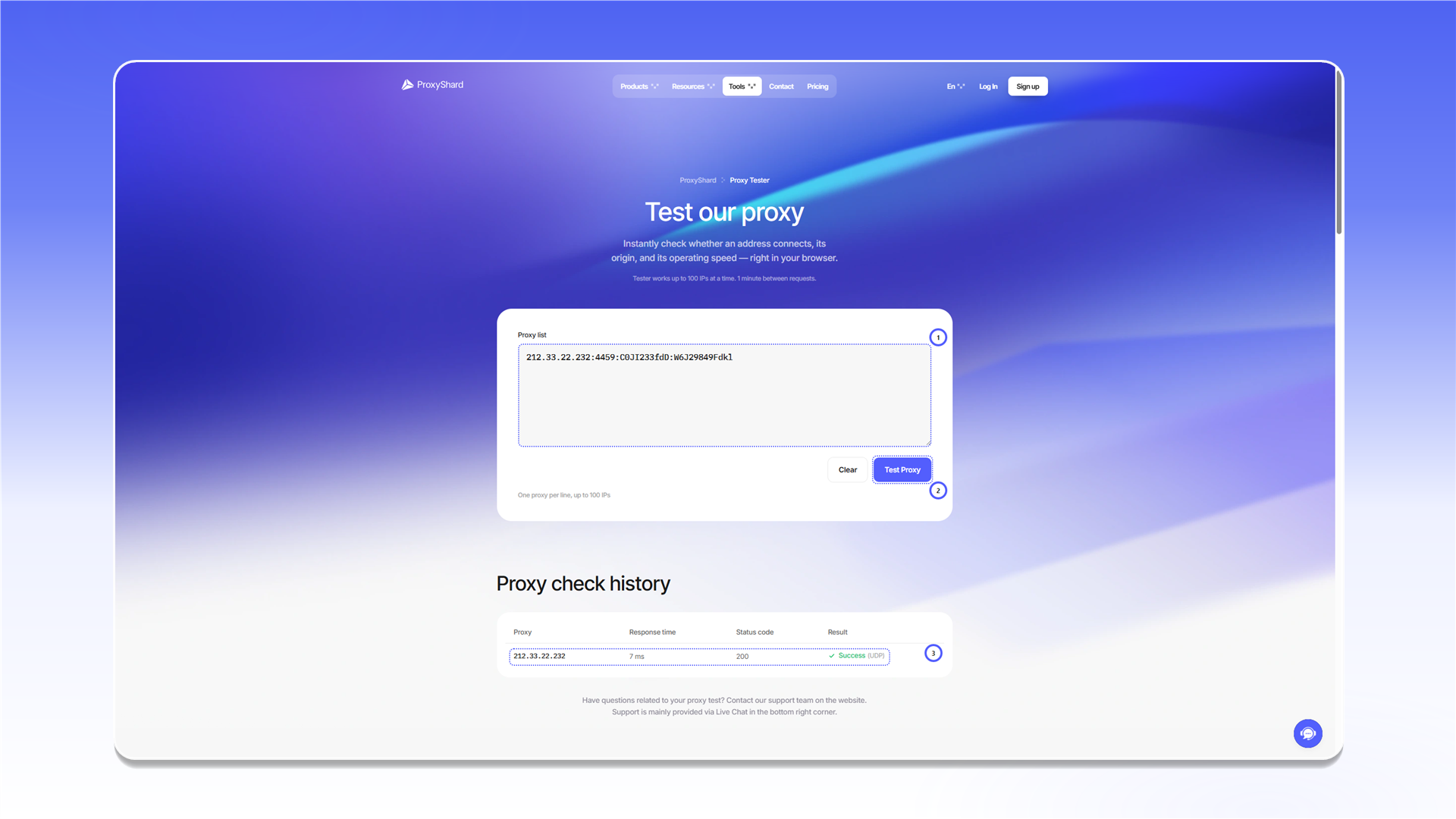
<mark style="color:purple;">ProxyShard Proxy Tester</mark> позволяет быстро проверить работоспособность ваших прокси прямо на сайте, без установки дополнительного софта и даже проверить поддержку UDP, Если вы используете SOCKS5

{% embed url="<https://proxyshard.com/proxy-tester>" %}

***

<figure><img src="/files/sAjRN3FuMygBzH8wqiE3" alt=""><figcaption></figcaption></figure>

## Как пользоваться

1. Откройте [proxyshard.com/proxy-tester](https://proxyshard.com/proxy-tester)
2. Вставьте прокси в текстовое поле (можно несколько, каждый с новой строки)
3. Нажмите <mark style="color:purple;">**Test Proxy**</mark>
4. Дождитесь результата в таблице <mark style="color:purple;">History</mark> справа

***

## Возможности

| Параметр                   | Значение                                                                        |
| -------------------------- | ------------------------------------------------------------------------------- |
| **Протоколы**              | HTTP, SOCKS5                                                                    |
| **Максимум прокси**        | до 100 штук                                                                     |
| **Ограничение**            | 1 запрос в минуту                                                               |
| **Поддерживаемые форматы** | `IP:PORT:LOGIN:PASSWORD`, `LOGIN:PASSWORD@IP:PORT` и другие стандартные форматы |

***

## Что показывает результат

После проверки в таблице <mark style="color:purple;">**History**</mark> отображается:

| Поле              | Описание                                                                                                                                                                                                                                                      |
| ----------------- | ------------------------------------------------------------------------------------------------------------------------------------------------------------------------------------------------------------------------------------------------------------- |
| **Proxy**         | IP-адрес, через который прошло соединение                                                                                                                                                                                                                     |
| **Response time** | Время ответа в миллисекундах. Чем меньше, тем быстрее прокси                                                                                                                                                                                                  |
| **Status code**   | HTTP-код ответа. `200` значит всё ок                                                                                                                                                                                                                          |
| **Result**        | Итоговый статус: <mark style="color:green;">**Success**</mark> (работает) или <mark style="color:red;">**Failed**</mark> (не работает). Также показывает тип соединения (HTTP/SOCKS5) и поддержку <mark style="color:purple;">UDP</mark>, Если прокси SOCSK5. |

***

## Если прокси не прошёл проверку

Не всегда это значит, что прокси неисправен. Проверьте:

* Правильно ли указан формат (логин\пароль\порт)
* Не перепутан ли протокол (HTTP \ SOCKS5)
* Прошло ли 2-3 минуты с момента покупки (Для DC\ISP прокси требуется до 2 минут для синхронизации)
* Нет ли блокировки со стороны вашего провайдера

Если всё правильно, но проверка не проходит, обратитесь в [поддержку](/contact-us.md).

{% hint style="info" %}
Для более детальной диагностики можно проверить прокси через командную строку. Подробнее: [Как проверить работоспособность прокси](/questions-and-answers/faq/how-to-check-proxy.md)
{% endhint %}


---

# Agent Instructions
This documentation is published with GitBook. GitBook is the documentation platform designed so that both humans and AI agents can read, navigate, and reason over technical content effectively. Learn more at gitbook.com.

## Querying This Documentation
If you need additional information that is not directly available in this page, you can query the documentation dynamically by asking a question.

Perform an HTTP GET request on the current page URL with the `ask` query parameter, and the optional `goal` query parameter:

```
GET https://docs.proxyshard.com/tools/proxy-tester.md?ask=<question>&goal=<endgoal>
```

`ask` is the immediate question: it should be specific, self-contained, and written in natural language.
`goal` is optional and describes the broader end goal you are ultimately trying to accomplish on behalf of the user. GitBook uses it to tailor the answer towards what is most useful for that goal.

The response will contain a direct answer to the question and relevant excerpts and sources from the documentation.

Use this mechanism when the answer is not explicitly present in the current page, you need clarification or additional context, or you want to retrieve related documentation sections.