Мобильные прокси
Мобильные прокси размещаются на роутерах с реальными SIM-картами. Тип и качество соединения идентичны обычному мобильному интернету через сотового оператора - точно такому же, как на вашем смартфоне. Поддерживают UDP, предлагают богатый выбор локаций и операторов.
Мобильные прокси работают на любом устройстве. Название «мобильные» отражает только способ подключения через SIM-карту, а не тип конечного устройства. Их одинаково хорошо использовать на ПК, ноутбуке, в антидетект-браузере.
Специфичный продукт - для тех, кто понимает зачем. Трафик идёт через реальную SIM-карту, поэтому скорость может варьироваться - это норма, а не неисправность. Если не уверены, подойдут ли мобильные прокси под вашу задачу, уточните в live-чате или рассмотрите ISP прокси (стабильная скорость, домашние IP) либо Резидентские прокси (большой пул, множество сессий).
1) Смена отпечатка устройства (p0f) доступна не на всех операторах. Полный список ограничений смотрите на странице Ограничения.
2) Недоступно пользователям РФ без использования VPN
Пошаговая инструкция по покупке и активации: Приобретение мобильных прокси.
Характеристики
| Параметр | Значение |
|---|---|
| Тип IP | Мобильный IPv4 |
| Шеринг | Нет - один порт на одного пользователя |
| Трафик | Безлимитный |
| Поддержка UDP | ✓ |
| Поддержка p0f | ✓ (не на всех локациях, см. выше) |
| Стоимость | от $4 / день · от $55 / месяц |
Доступные локации
| Страна | Операторы |
|---|---|
| 🇺🇸 США | T-Mobile (5G), Verizon (5G, Colorado) |
| 🇬🇧 Великобритания | O2, Vodafone |
| 🇩🇪 Германия | O2, Vodafone |
| 🇫🇷 Франция | SFR (5G), Bouygues Telecom (5G) |
| 🇮🇹 Италия | Vodafone (5G), WindTre (5G) |
| 🇪🇸 Испания | Digimobil, Movistar (5G), Vodafone (5G) |
| 🇵🇹 Португалия | NOS (5G) |
| 🇳🇱 Нидерланды | Ziggo (5G), Odido (5G) |
| 🇮🇪 Ирландия | Vodafone (5G), Three (5G) |
| 🇵🇱 Польша | T-Mobile (5G) |
| 🇺🇦 Украина | Lifecell, Vodafone, Kyivstar |
| 🇲🇩 Молдова | Moldcell, Moldtelecom |
| 🇨🇦 Канада | Rogers |
| 🇮🇩 Индонезия | Telkomsel |
Список регулярно расширяется. Актуальные локации и стоимость - на странице покупки Mobile proxy.
Как приобрести
- Откройте раздел
Mobile Proxy. - Выберите страну через
Country filter. - В карточке подходящего оператора выберите срок аренды.
- Нажмите
Buy.
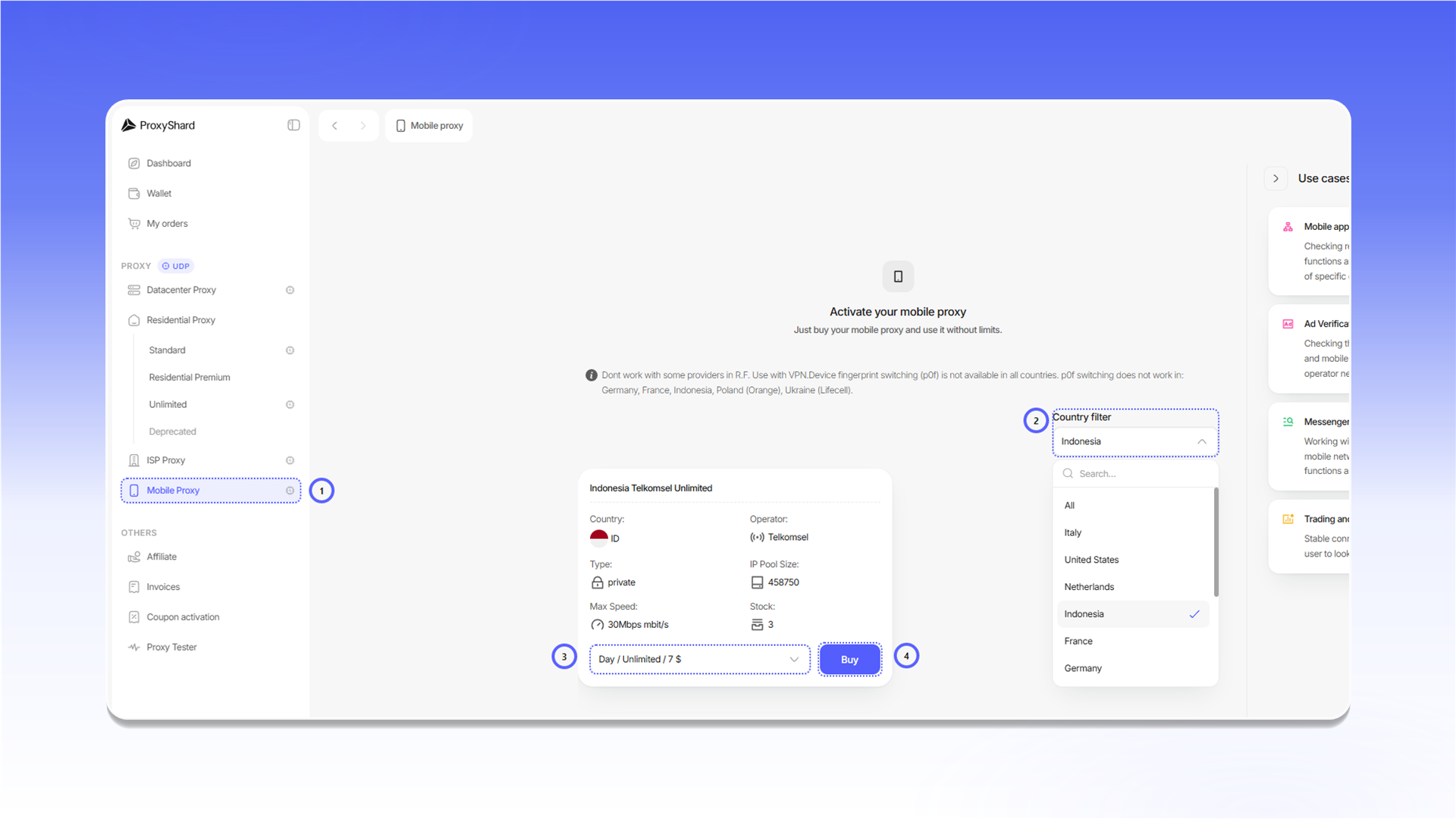
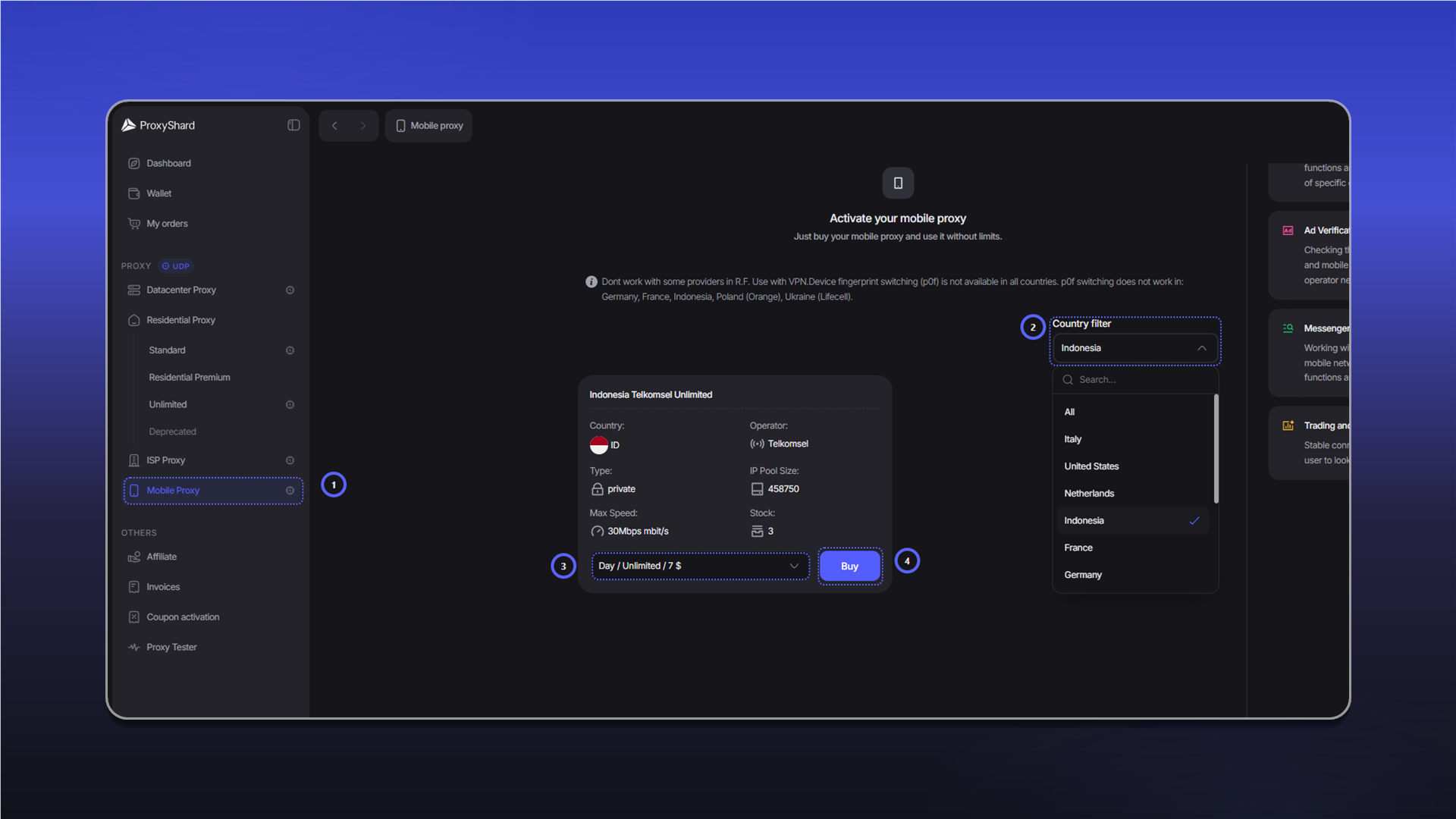
Оплата, первая активация и продление описаны в инструкции Приобретение мобильных прокси.
Поля и управление заказом
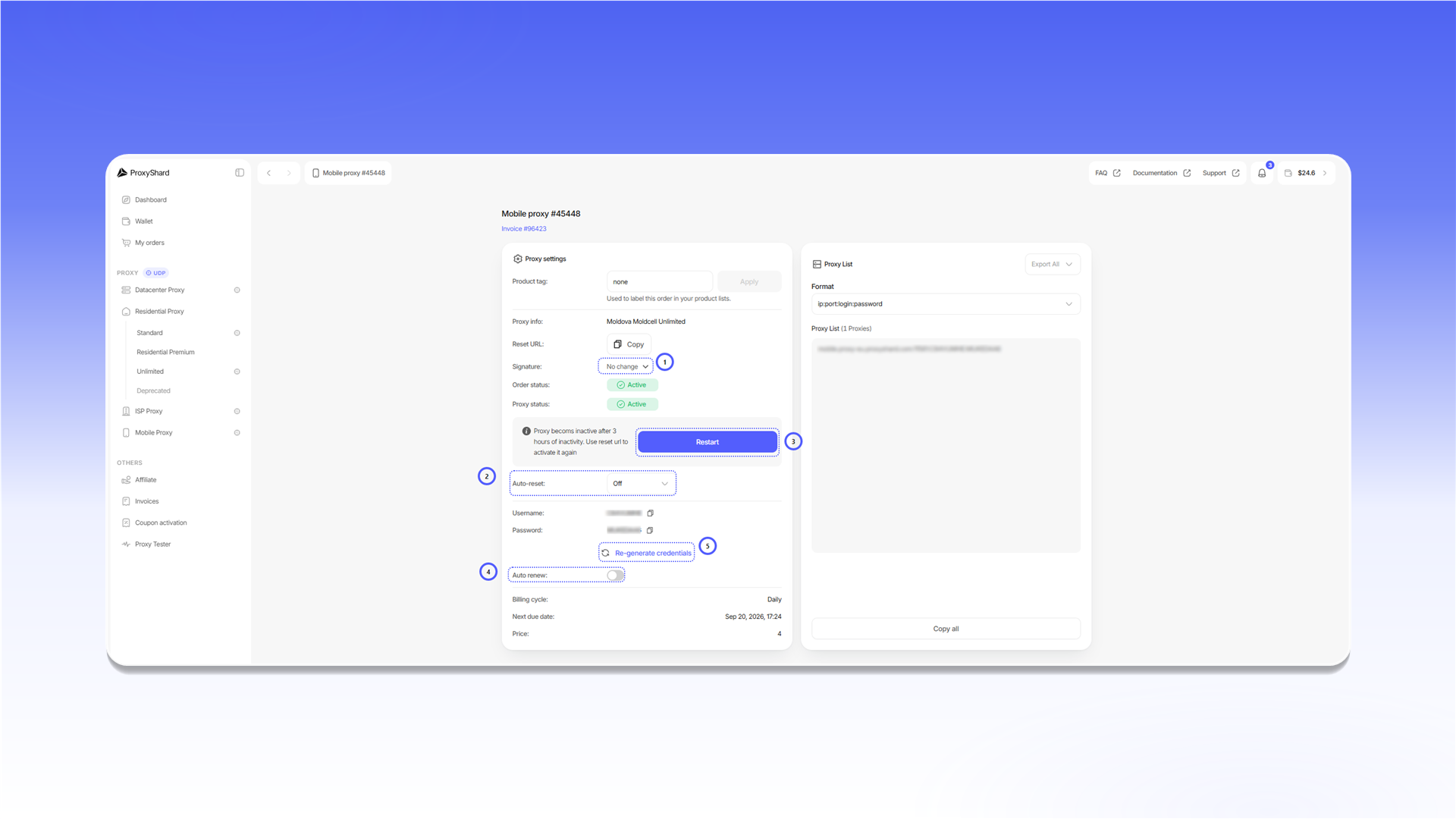
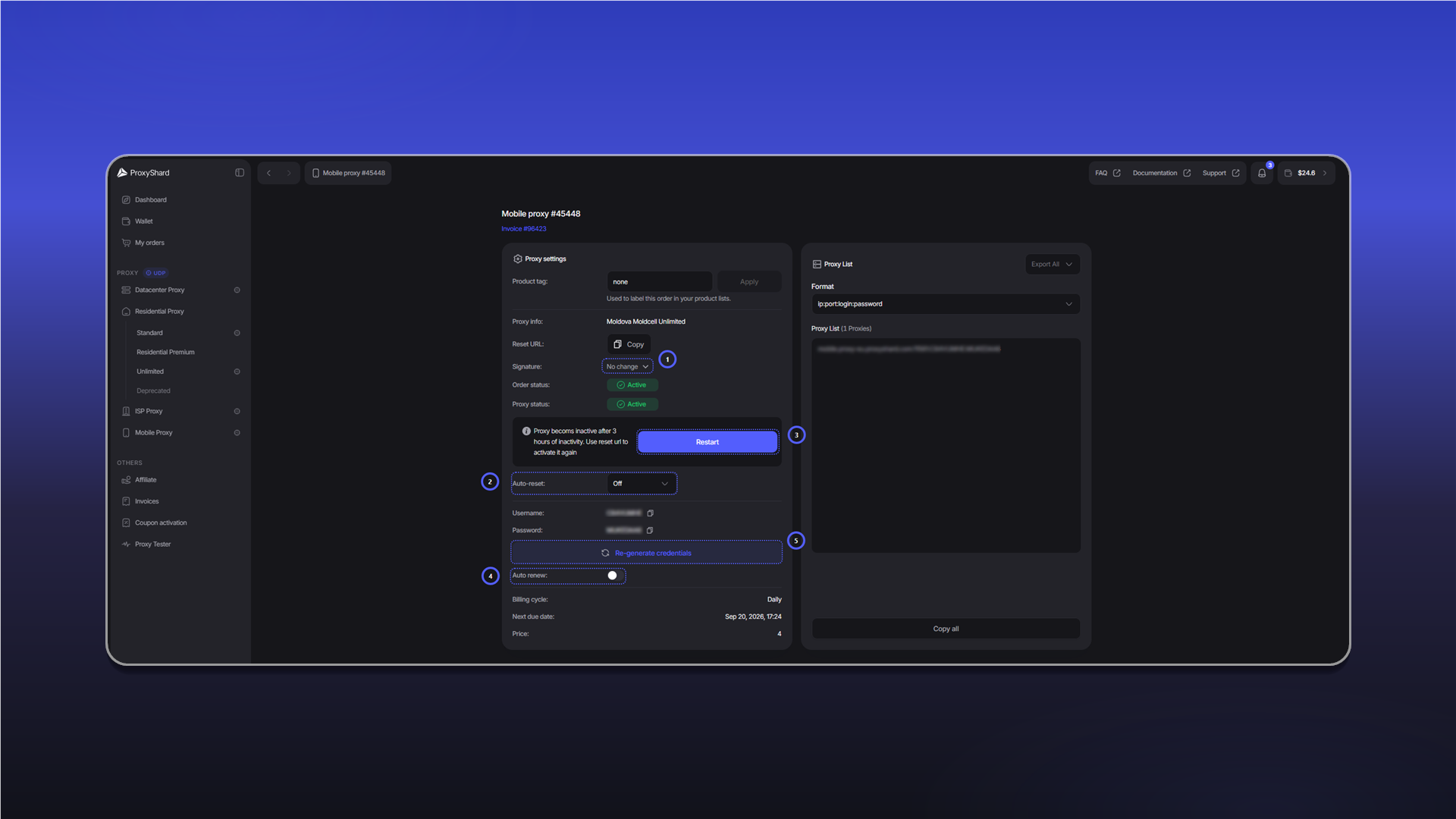
Signatureвыбирает сетевую сигнатуру. Доступныw,w10,w7,linux,android,macosиios. После смены сигнатуры обязательно нажмитеRestart.Auto-resetавтоматически перезапускает подключение через выбранный интервал.Restartактивирует порт или меняет IP. То же действие можно выполнить через персональныйReset URL.Auto renewвключает автоматическое продление заказа при достаточном балансе.Re-generate credentialsсоздаёт новые данные авторизации. После этого старые строки подключения перестают работать.
Остальные поля:
Product tagзадаёт метку для поиска заказа в списках.Proxy infoпоказывает страну, оператора и тип тарифа.Order statusпоказывает состояние заказа:Active,On-holdилиCanceled.Proxy statusпоказывает состояние порта:ActiveилиDisconnected.UsernameиPasswordсодержат данные авторизации.Billing cycle,Next due dateиPriceпоказывают срок аренды и следующий платёж.- В
Proxy Listможно выбрать формат строки, скопировать список черезCopy allили выгрузить его черезExport All.
После покупки и после трёх часов бездействия порт нужно активировать через Restart или Reset URL. Пока Proxy status показывает Disconnected, прокси не работает.
Для каких задач подходит
Социальные сети и мультиаккаунтинг, mobile ad verification, проверка мобильной рекламы, большинство криптобирж, Polymarket, тестирование мобильных сайтов и приложений, web scraping мобильных версий сайтов, SEO мониторинг мобильной выдачи, e-commerce мониторинг мобильных цен, геотаргетированное тестирование контента, travel scraping мобильных тарифов, brand monitoring в мобильной среде.
Плюсы и минусы Мобильных прокси
Плюсы:
- Выбор конкретного оператора - подключение от нужного сотового провайдера
- Смена IP по Reset URL - ротация не чаще одного раза в минуту
- Поддержка p0f - доступна на большинстве локаций (см. Ограничения)
- Поддержка UDP
- Гибкий срок аренды - от одного дня до месяца
- Порт в одни руки - одна SIM-карта, один пользователь
Минусы:
- Возможны просадки скорости при перегрузке сотовой станции оператора - редко, но возможно
- Сложный продукт для новичков - рекомендуем уточнить в поддержке перед покупкой
- Подмена p0f на macOS / iOS снижает скорость канала из-за сложности алгоритма
- Динамический IP - адрес может смениться по инициативе оператора в любой момент
- Одна сессия одновременно - один порт держит один IP. Если нужно подключить несколько устройств одновременно (не поочерёдно, а именно в один момент) - приобретайте отдельный порт или рассматривайте Резидентские прокси
Примеры настройки прокси собраны в разделе Инструкция по использованию.
Обновлено