# Proxifier

{% hint style="danger" %}
This solution does not support UDP tunneling!
{% endhint %}

{% hint style="info" %}
This program is paid; its trial period is 31 days.
{% endhint %}

## Installation **Proxifier.**

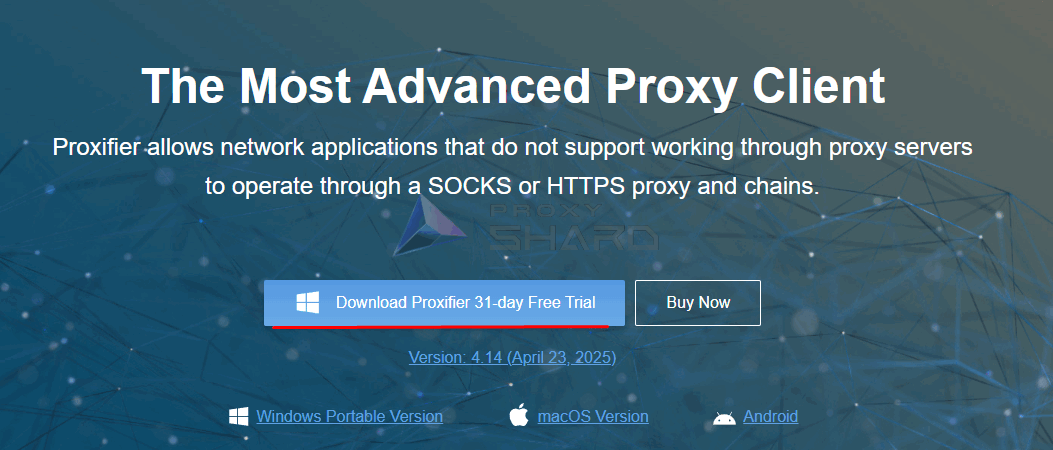
Go to [link](https://www.proxifier.com/download/) to download Proxifier. Then install and run the program

<figure><img src="https://3044836706-files.gitbook.io/~/files/v0/b/gitbook-x-prod.appspot.com/o/spaces%2F3l0uO4OV4DD1gK4uKGC6%2Fuploads%2Fgit-blob-7d3faa1b0bce4c10ebdce5d3ef622aeed8be3b06%2Fimage.png?alt=media" alt=""><figcaption></figcaption></figure>

## Proxifier setup

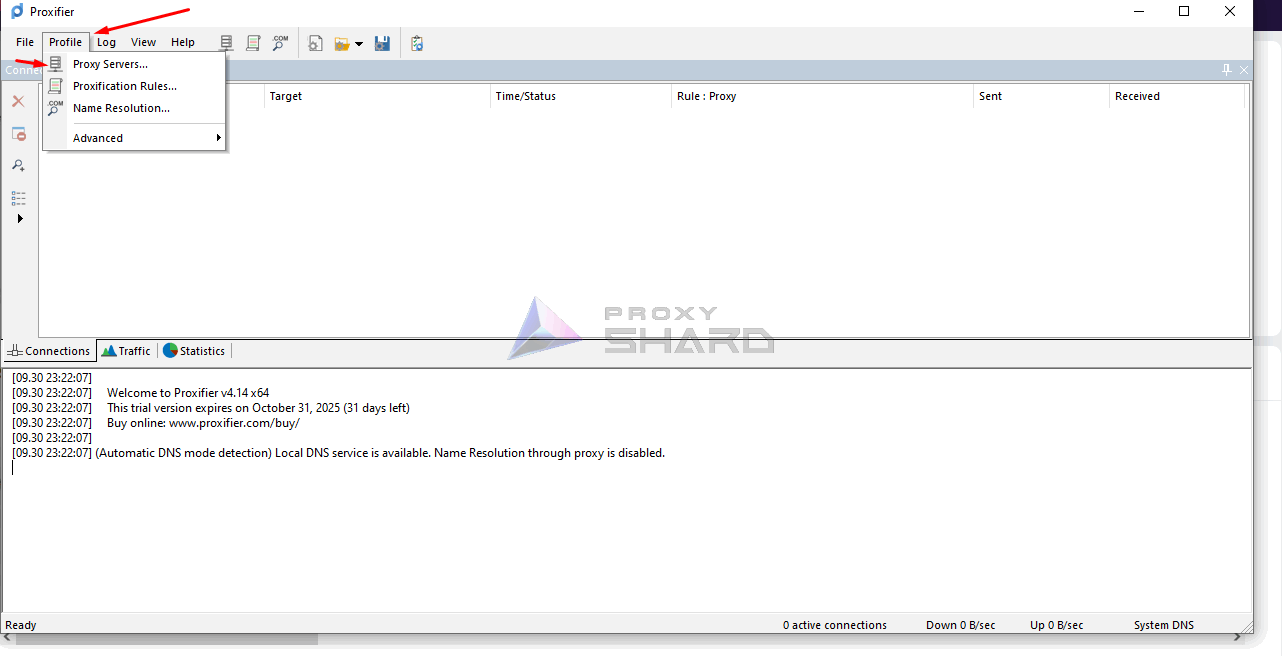
To get started, you need to specify a proxy server; open the tab <mark style="color:purple;">Proxy Servers</mark>

<figure><img src="https://3044836706-files.gitbook.io/~/files/v0/b/gitbook-x-prod.appspot.com/o/spaces%2F3l0uO4OV4DD1gK4uKGC6%2Fuploads%2Fgit-blob-53dc9ef094b3e5033f4382422a25772646c3edeb%2Fimage.png?alt=media" alt=""><figcaption></figcaption></figure>

## **Adding a proxy**

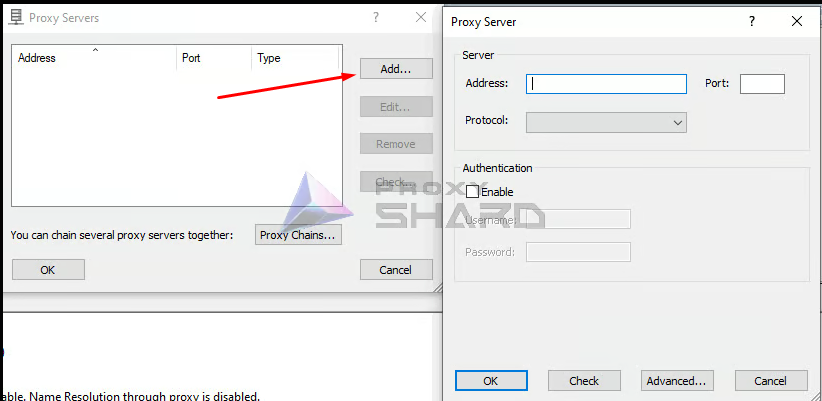
Add a connection using the Add button

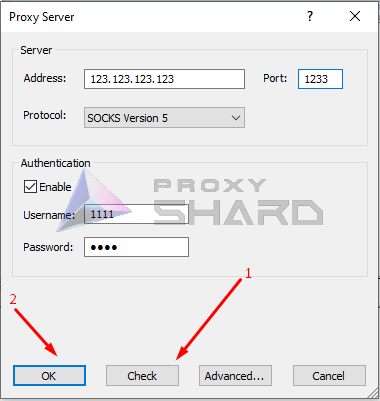
Enter the connection details, specifying the required connection protocol, and click Save

<figure><img src="https://3044836706-files.gitbook.io/~/files/v0/b/gitbook-x-prod.appspot.com/o/spaces%2F3l0uO4OV4DD1gK4uKGC6%2Fuploads%2Fgit-blob-ec32834db8d0a472662d90661adc84d4025c5229%2Fimage.png?alt=media" alt=""><figcaption></figcaption></figure>

<figure><img src="https://3044836706-files.gitbook.io/~/files/v0/b/gitbook-x-prod.appspot.com/o/spaces%2F3l0uO4OV4DD1gK4uKGC6%2Fuploads%2Fgit-blob-440dabc5f26550c858b38eb9261f3a989b207800%2FImage00003.PNG?alt=media" alt=""><figcaption></figcaption></figure>

Be sure to run a test before saving. If the test fails, most likely the connection details are incorrect or the specified protocol does not match the port from the order.

{% hint style="info" %}
**An example of proxy setup can be found in the section "**[**Setup instructions**](https://docs.proxyshard.com/eng/user-guide/getting-started)**"**
{% endhint %}

## Routing rules setup

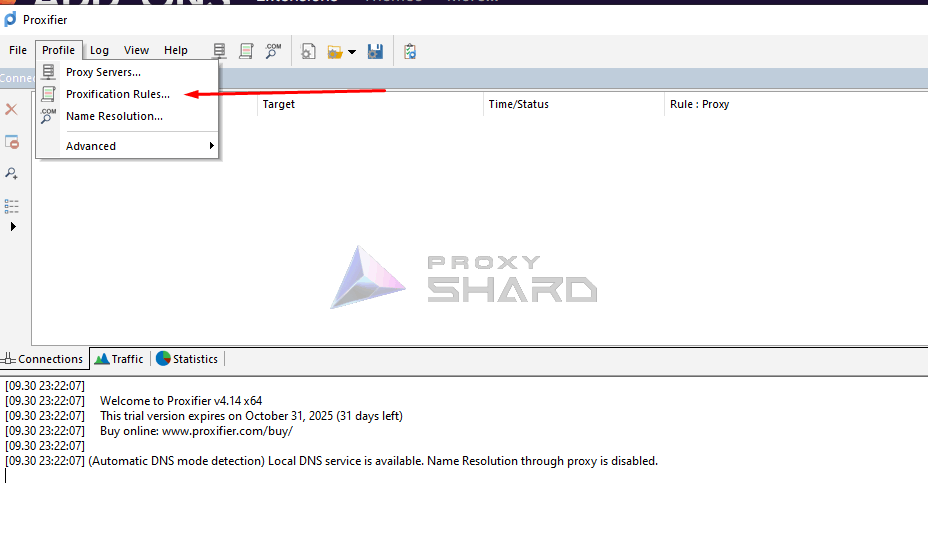
Before starting work, routing also needs to be configured. To do this, go to Proxification Rule and specify the proxy settings. In our example, we will proxy all applications on the computer; be sure to specify in the rule which route the traffic should follow

<figure><img src="https://3044836706-files.gitbook.io/~/files/v0/b/gitbook-x-prod.appspot.com/o/spaces%2F3l0uO4OV4DD1gK4uKGC6%2Fuploads%2Fgit-blob-ca910947c8673cf6d8f234e40e2df3e351867f69%2FImage00002.PNG?alt=media" alt=""><figcaption></figcaption></figure>

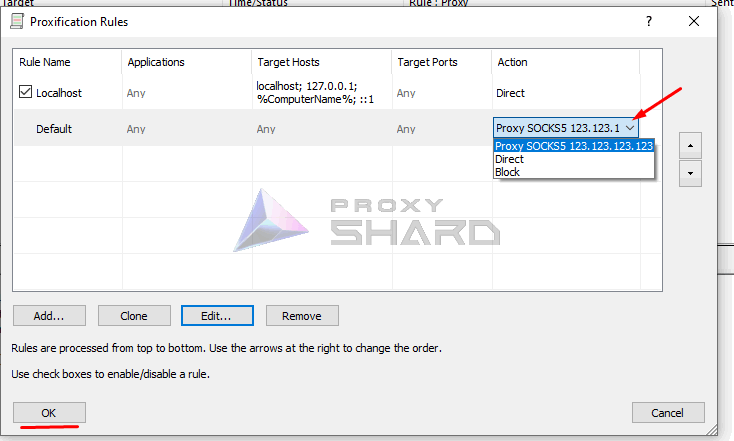
In the proxy rules, specify the previously created proxy so that traffic can pass through it

<figure><img src="https://3044836706-files.gitbook.io/~/files/v0/b/gitbook-x-prod.appspot.com/o/spaces%2F3l0uO4OV4DD1gK4uKGC6%2Fuploads%2Fgit-blob-cc419580b0e3690973dea726d692e166203759d8%2FImage00001.PNG?alt=media" alt=""><figcaption></figcaption></figure>

**Done! Now you can use the application.**