> For the complete documentation index, see [llms.txt](https://docs.proxyshard.com/llms.txt). Markdown versions of documentation pages are available by appending `.md` to page URLs; this page is available as [Markdown](https://docs.proxyshard.com/eng/our-products/residential-proxies.md).
# Residential proxies
Residential proxies are hosted on real home devices. They are ideal for working with many home-ISP IP addresses and support fine-grained targeting down to operator selection.\
You can review product restrictions [here](/eng/our-products/restrictions.md).
{% hint style="info" %}
Unused traffic does not expire at the end of the month. It remains on the order until it is fully used.
{% endhint %}
{% hint style="warning" %}
Addresses are issued on real home IPs. A session can change at any moment if the device in the pool leaves the traffic-sharing network. If you need a **static IP**, see [Datacenter](/eng/our-products/datacenter-proxies.md) or [ISP proxies](/eng/our-products/isp-proxies.md).
{% endhint %}
{% embed url="" %}
Step-by-step purchase and payment guide: [Purchasing residential proxies](/eng/site-navigation/buying-and-renewing/buying-residential-proxies.md).
## Plans
| Parameter | [Standard](/eng/our-products/residential-proxies/standard-residential.md) | [Unlimited](/eng/our-products/residential-proxies/unlimited-residential-proxy.md) | [Premium](/eng/our-products/residential-proxies/premium-residential.md) |
| ------------------------------------------------------------------------- | ------------------------------------------------------------------------- | --------------------------------------------------------------------------------- | ----------------------------------------------------------------------- |
| Pool size | 300k - 400k | 300k - 400k (= Standard) | 3.8M - 4.6M |
| Max connections | 35,000 | 5,000 | - |
| Max speed | 75 Mbps | 75 Mbps | 75 Mbps |
| [UDP support](/eng/technologies-and-capabilities/about-udp.md) | ✓ (except USA; port restrictions apply) | ✓ (except USA; port restrictions apply) | ✓ (except some cities and macOS/iOS devices) |
| [Device OS filtering](/eng/technologies-and-capabilities/p0f-spoofing.md) | ✗ | ✗ | ✓ |
| Unlimited plan | ✗ | ✓ | ✗ |
| Billing | Per GB (Pay as you go) | Day / Half-month / Month | Per GB (Pay as you go) |
| Price | **$2 / GB** | **$30** / day · **$399** / half-month · **$699** / month | **$3 / GB** |
## Available countries
### Standard and Unlimited Residential
**165 countries** and the `Random` option for automatic country selection are available.
{% content-ref url="/pages/EaSuXTWoqz6xnXtvkL1b" %}
[Standard and Unlimited countries](/eng/our-products/residential-proxies/available-countries.md)
{% endcontent-ref %}
### Premium Residential
**214 countries** are available.
{% content-ref url="/pages/Kxy1mJEWxuCAEGIHxkWL" %}
[Premium countries](/eng/our-products/residential-proxies/premium-available-countries.md)
{% endcontent-ref %}
## How to purchase
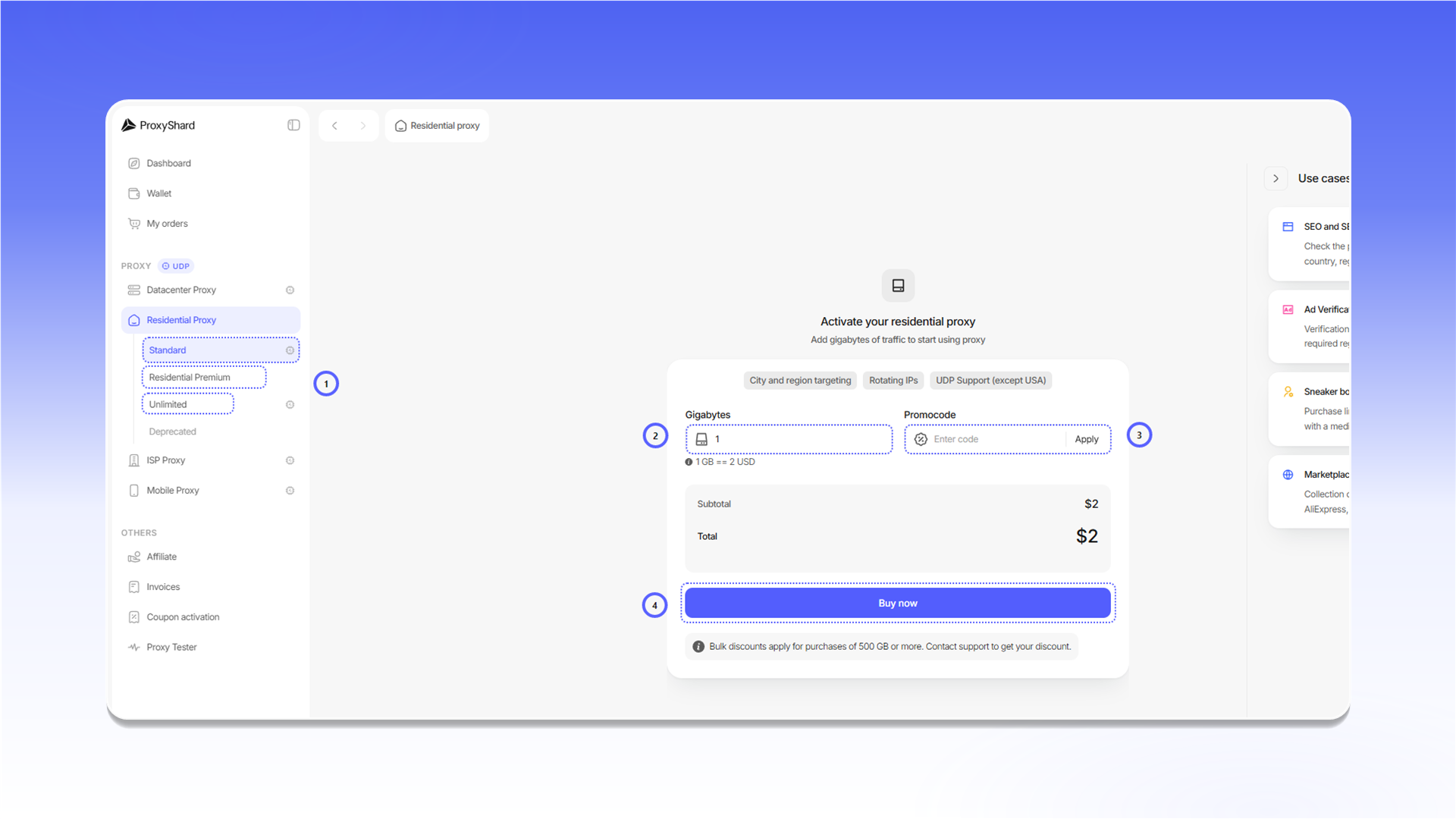
1. Under `Residential Proxy`, select `Standard`, `Residential Premium`, or `Unlimited`.
2. For a traffic-based plan, enter the number of gigabytes.
3. If you have a promo code, enter it in `Promocode` and click `Apply`.
4. Check the total and click `Buy now`.
Payment and adding traffic are covered in [Purchasing residential proxies](/eng/site-navigation/buying-and-renewing/buying-residential-proxies.md).
## Proxy configuration
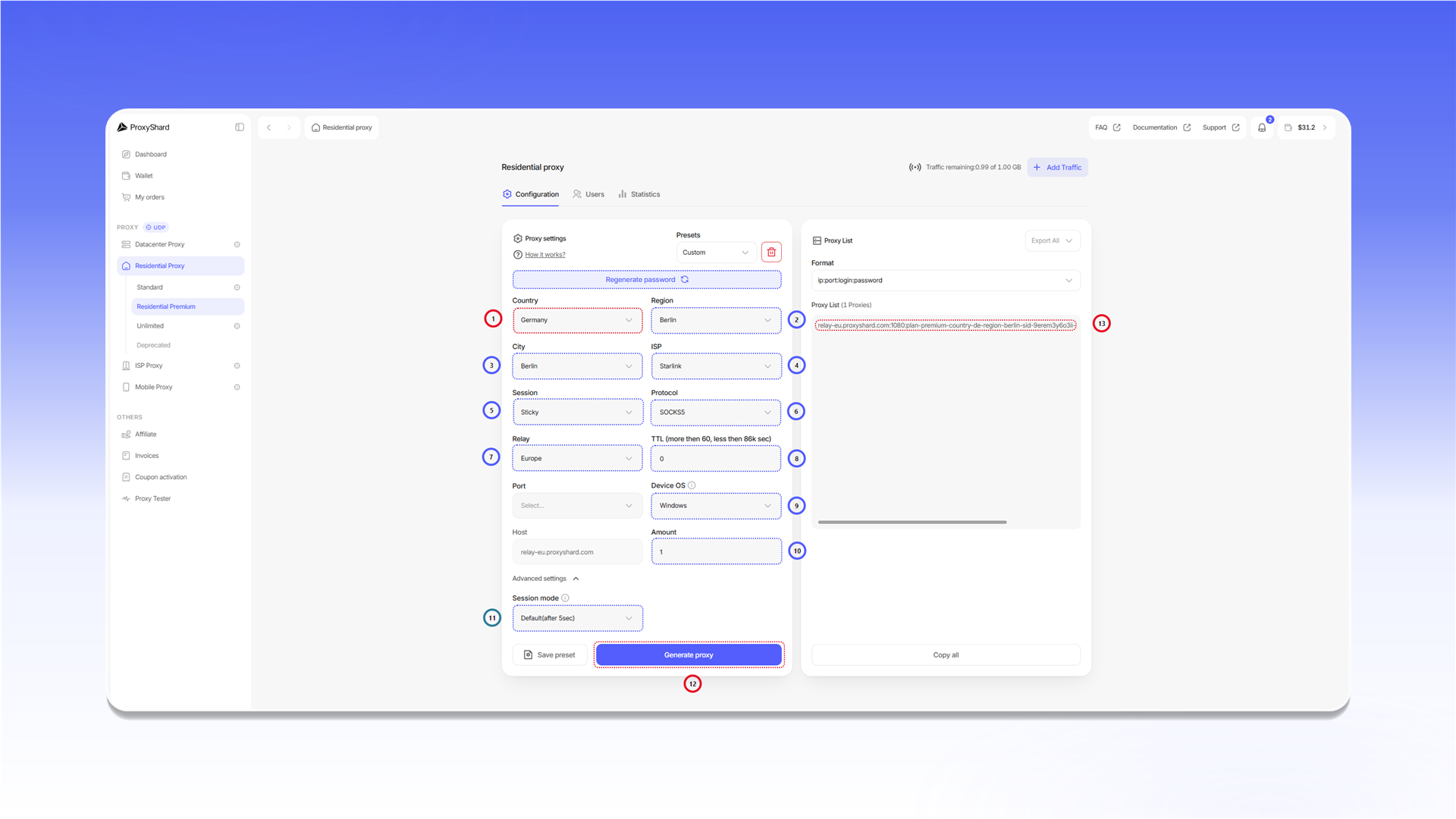
For a basic connection, select `Country` and click `Generate proxy`. Use the other fields only when you need more precise targeting or session control.
1. `Country` selects the country.
2. `Region` selects a region within the country.
3. `City` selects the city.
4. `ISP` filters addresses by provider. This field is available only for [Premium Residential](/eng/our-products/residential-proxies/premium-residential.md).
5. `Session` controls rotation. `Sticky` keeps one IP for the configured `TTL`, while `Rotate` changes the IP on every request.
6. `Protocol` selects `HTTP` or `SOCKS5`.
7. `Relay` changes the connection server. Use it only if you have connection issues.
8. `TTL` sets the IP lifetime for a `Sticky` session. The minimum value is 60 seconds.
9. `Device OS` filters the [Premium Residential](/eng/our-products/residential-proxies/premium-residential.md) pool by the operating system of the device.
10. `Amount` sets the number of connection strings generated at once.
11. `Session mode` controls Premium Residential sessions. `Default(after 5sec)` switches sessions if a device does not respond for more than five seconds. `Static` waits for the same device to return for the configured `TTL`.
12. `Generate proxy` creates connection strings with the selected settings.
13. `Proxy List` displays the generated strings. Use `Format` to change their format and `Copy all` to copy the complete list.
`Presets` stores reusable sets of settings. Configure the fields, click `Save preset`, and select the saved preset the next time you generate proxies.
{% hint style="warning" %}
Combining `Device OS` with city and provider targeting can reduce the available pool considerably. Suitable macOS or iOS devices may not be available in Tier 2 and Tier 3 countries.
{% endhint %}
{% hint style="warning" %}
With a non-default `Session mode`, a connection string may stop responding when the selected device leaves the network. Generate a new string with `Generate proxy` if this happens.
{% endhint %}
{% hint style="danger" %}
`Regenerate password` changes the order password and immediately invalidates every previously generated string. Use it only if the credentials may have been exposed. To track traffic by user, use the `Users` tab.
{% endhint %}
`Proxy List` is a dynamic field, not storage. Previously generated strings remain valid because the selected parameters are encoded in `Username`. Use `Presets` to save the settings themselves.
## Connection string format
The standard format is:
```
host:port:username:password
```
* `host` specifies the connection server, for example `relay-eu.proxyshard.com`.
* `port` connects to that server and does not determine the final IP by itself.
* `username` contains the targeting parameters and the `sid` session identifier.
* `password` is used for authentication.
You can add the complete string to a browser, application, or another client. Step-by-step examples are available in the [setup guides](/eng/usage-instructions/getting-started.md).
## Statistics
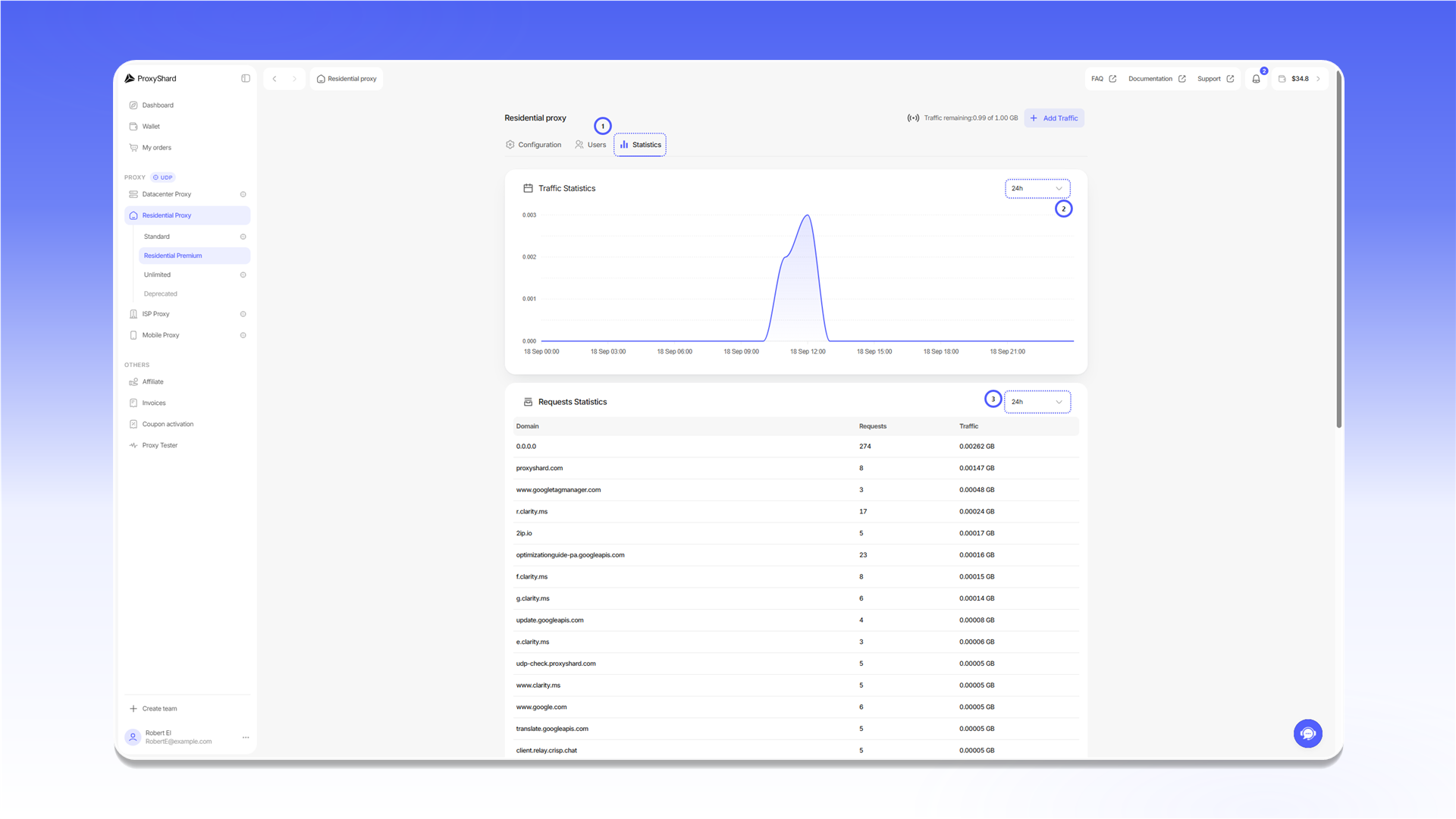
1. Open the `Statistics` tab.
2. Select the period for `Traffic Statistics`.
3. Select the period for `Requests Statistics` separately.
New data may take 10-20 minutes to appear. Statistics are retained for one month.
## What tasks they fit
Social media and multi-accounting, crypto exchanges (Binance, Bybit and others), Polymarket, web scraping, SEO monitoring, ad verification, e-commerce analytics, price monitoring, geo-targeted website testing.
## Pros and cons of Residential proxies
#### Pros:
* **Flexible billing** - Pay as you go or an unlimited subscription (Unlimited)
* **IP rotation** - change addresses on demand or by timer (TTL)
* **Wide geo-targeting** - select country, region, city and operator
* **Home-origin addresses** - IPs are registered to home ISPs
* **UDP support** - available on Standard, Unlimited and Premium subject to product restrictions
#### Cons:
* **Possible speed drops** - performance depends on the end device's internet connection; this is inherent to this proxy type
* **Dynamic IP** - the address may change at any moment; if you need a static IP, see [ISP](/eng/our-products/isp-proxies.md) or [Datacenter](/eng/our-products/datacenter-proxies.md)
* **p0f spoofing is unavailable** - Premium Residential offers only [Device OS filtering](/eng/technologies-and-capabilities/p0f-spoofing.md)
* **UDP restrictions** - Standard and Unlimited do not support UDP in the USA; Premium has exceptions for certain cities and macOS/iOS devices. General [port restrictions](/eng/our-products/restrictions.md) also apply
{% hint style="success" %}
Need a static address with UDP? Choose [ISP proxies](/eng/our-products/isp-proxies.md).
{% endhint %}
{% hint style="info" %}
See the [setup guides](/eng/usage-instructions/getting-started.md) for proxy configuration instructions.
{% endhint %}
---
# Agent Instructions
This documentation is published with GitBook. GitBook is the documentation platform designed so that both humans and AI agents can read, navigate, and reason over technical content effectively. Learn more at gitbook.com.
## Querying This Documentation
If you need additional information that is not directly available in this page, you can query the documentation dynamically by asking a question.
Perform an HTTP GET request on the current page URL with the `ask` query parameter, and the optional `goal` query parameter:
```
GET https://docs.proxyshard.com/eng/our-products/residential-proxies.md?ask=&goal=
```
`ask` is the immediate question: it should be specific, self-contained, and written in natural language.
`goal` is optional and describes the broader end goal you are ultimately trying to accomplish on behalf of the user. GitBook uses it to tailor the answer towards what is most useful for that goal.
The response will contain a direct answer to the question and relevant excerpts and sources from the documentation.
Use this mechanism when the answer is not explicitly present in the current page, you need clarification or additional context, or you want to retrieve related documentation sections.