> For the complete documentation index, see [llms.txt](https://docs.proxyshard.com/llms.txt). Markdown versions of documentation pages are available by appending `.md` to page URLs; this page is available as [Markdown](https://docs.proxyshard.com/eng/our-products/isp-proxies.md).
# ISP proxies
ISP proxies, like Datacenter proxies, are issued to one user only: no sharing, meaning no more than one user per address and no hidden sharing. The addresses are IPv4 and support UDP.
ISP proxies combine the benefits of both Residential proxies and Datacenter proxies. They are as stable and static as Datacenter proxies, but they use IP addresses registered to home internet providers, like Residential proxies.
This makes them a good option for Tier-1 sites and services that are sensitive to the IP type. UDP support also makes them suitable for WebRTC and other UDP-based workflows.
ISP proxies support p0f network fingerprint spoofing.
{% embed url="" %}
Step-by-step purchase and payment guide: [Purchasing ISP / Datacentre proxies](/eng/site-navigation/buying-and-renewing/buying-datacenter-proxies.md).
## Characteristics
| Parameter | Value |
| ----------------------------------------------------------------- | ------------------------ |
| IP type | IPv4 (home ISP) |
| Sharing | No - one IP per user |
| Connection limit | 2,500 per IP |
| [UDP support](/eng/technologies-and-capabilities/about-udp.md) | ✓ |
| [p0f support](/eng/technologies-and-capabilities/p0f-spoofing.md) | ✓ (+$0.6 / IP per month) |
| Price | **$2** / IP per month |
## Available locations
| Country |
| ------------ |
| 🇹🇷 Turkey |
| 🇺🇸 USA |
| 🇨🇿 Czechia |
| 🇺🇦 Ukraine |
{% hint style="info" %}
The list of locations is constantly expanding.
{% endhint %}
## How to purchase
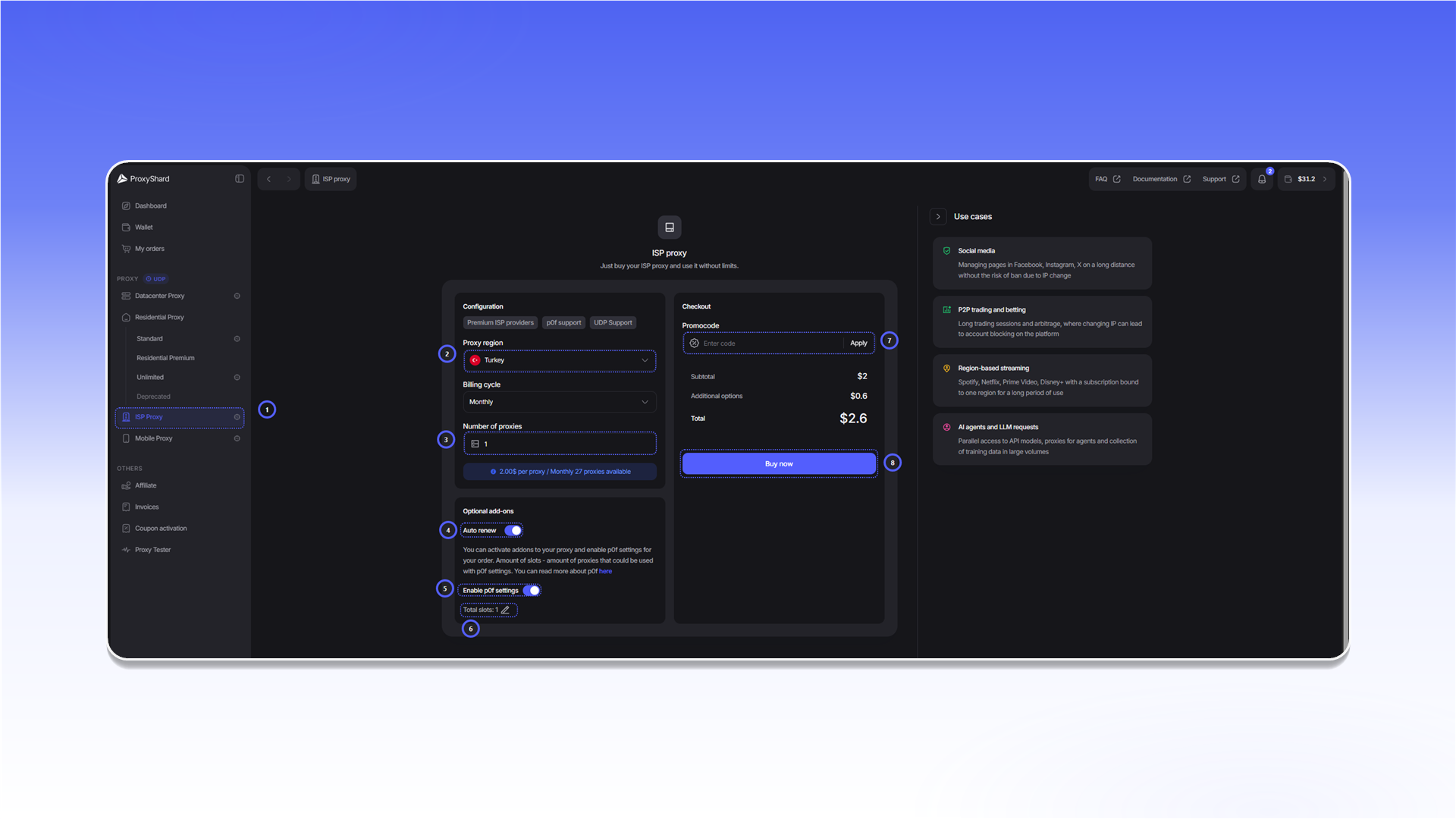
1. Open `ISP Proxy`.
2. Select a country in `Proxy region`.
3. Enter the quantity in `Number of proxies`.
4. Enable `Auto renew` if you want the order to renew automatically.
5. Enable `Enable p0f settings` if required.
6. In `Total slots`, enter how many proxies should use p0f spoofing.
7. If you have a promo code, enter it in `Promocode` and click `Apply`.
8. Review the total and click `Buy now`.
Payment and renewal are covered in [Purchasing ISP / Datacentre proxies](/eng/site-navigation/buying-and-renewing/buying-datacenter-proxies.md).
{% hint style="info" %}
After payment, allow 1-2 minutes for the order to synchronize and the proxies to start working.
{% endhint %}
## Order fields
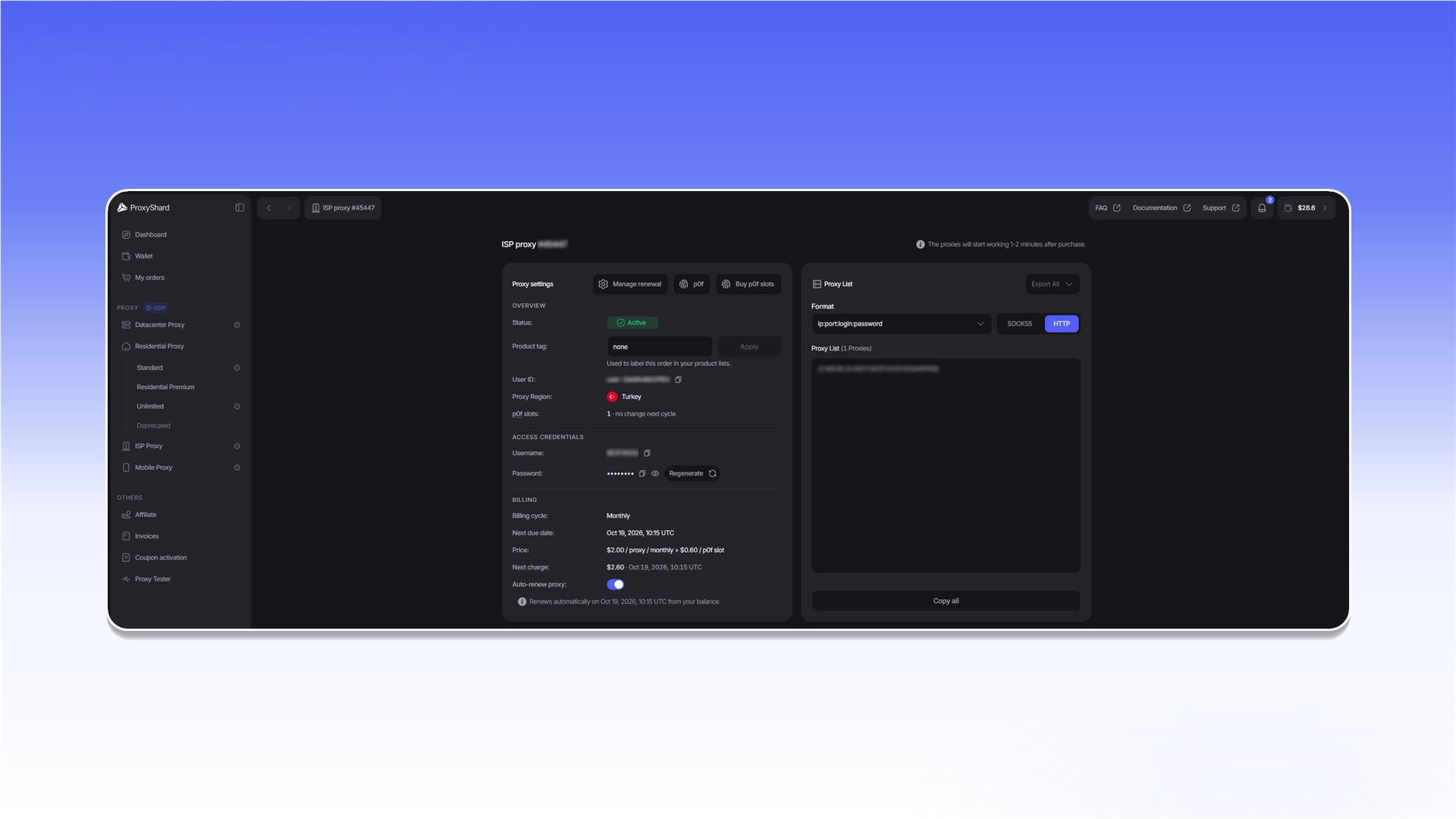
* `Status` shows the order state: `Active`, `On-hold`, or `Canceled`.
* `Product tag` adds a label that you can use to find the order in product lists.
* `User ID` identifies the order internally and may be requested by support.
* `Proxy Region` shows the selected country.
* `p0f slots` shows the active p0f slots and the change scheduled for the next billing period.
* `Username` and `Password` contain the credentials. `Regenerate` creates a new password, so existing proxy strings stop working.
* `Billing cycle`, `Next due date`, `Price`, and `Next charge` show the rental term and the next payment.
* `Auto-renew proxy` controls automatic renewal. The same settings are available through `Manage renewal`.
* `p0f` and `Buy p0f slots` open the fingerprint settings and the purchase of additional slots.
* In `Proxy List`, you can select `HTTP` or `SOCKS5`, change the proxy string format, copy the list with `Copy all`, or download it with `Export All`.
{% hint style="danger" %}
An order with the `Canceled` status cannot be restored. This status is assigned after three days without payment.
{% endhint %}
## What tasks they fit
Any crypto exchanges, Polymarket, stable web scraping sessions, SEO monitoring, e-commerce price monitoring, marketplace checks, ad verification, brand monitoring, testing sites from a home-ISP ASN, QA of authorization and user scenarios, website availability monitoring, account management.
## Pros and cons of ISP proxies
#### Pros:
* **Real ISP addresses** - IPs are listed under real home internet providers (in geolocation databases the ASN type is provider, not hosting)
* **Reliable home-ISP carriers**
* **Wide channel with minimal latency**
* **Static addresses, one user only** - the IP does not change during the rental
* **p0f and UDP support**
#### Cons:
* **Price** - higher than Datacenter proxies
* **Number of available locations** - integration with real providers is extremely complex, but we keep expanding the list
{% hint style="info" %}
See the [setup guides](/eng/usage-instructions/getting-started.md) for proxy configuration instructions.
{% endhint %}
---
# Agent Instructions
This documentation is published with GitBook. GitBook is the documentation platform designed so that both humans and AI agents can read, navigate, and reason over technical content effectively. Learn more at gitbook.com.
## Querying This Documentation
If you need additional information that is not directly available in this page, you can query the documentation dynamically by asking a question.
Perform an HTTP GET request on the current page URL with the `ask` query parameter, and the optional `goal` query parameter:
```
GET https://docs.proxyshard.com/eng/our-products/isp-proxies.md?ask=&goal=
```
`ask` is the immediate question: it should be specific, self-contained, and written in natural language.
`goal` is optional and describes the broader end goal you are ultimately trying to accomplish on behalf of the user. GitBook uses it to tailor the answer towards what is most useful for that goal.
The response will contain a direct answer to the question and relevant excerpts and sources from the documentation.
Use this mechanism when the answer is not explicitly present in the current page, you need clarification or additional context, or you want to retrieve related documentation sections.