> For the complete documentation index, see [llms.txt](https://docs.proxyshard.com/llms.txt). Markdown versions of documentation pages are available by appending `.md` to page URLs; this page is available as [Markdown](https://docs.proxyshard.com/eng/our-products/datacenter-proxies.md).
# Datacenter proxies
Datacenter proxies are designed for high-load tasks. They are hosted in data centers and provide high speed and stable connections.
Datacenter proxies, like ISP proxies, are issued to one user only: no sharing, meaning no more than one user per address and no hidden sharing. The addresses are IPv4 and also support UDP.
{% embed url="" %}
Step-by-step purchase and payment guide: [Purchasing ISP / Datacentre proxies](/eng/site-navigation/buying-and-renewing/buying-datacenter-proxies.md).
## Characteristics
| Parameter | Value |
| ----------------------------------------------------------------- | ------------------------------------------------------------------------------ |
| IP type | IPv4 |
| Sharing | No - one IP per user |
| Connection limit | 2,500 per IP |
| [UDP support](/eng/technologies-and-capabilities/about-udp.md) | ✓ |
| [p0f support](/eng/technologies-and-capabilities/p0f-spoofing.md) | ✓ (with monthly rental, +$0.3 / IP) |
| Price | **$0.3** / 3 days · **$0.4** / week · **$0.7** / half-month · **$1.2** / month |
## Available locations
* 🇩🇪 Germany
* 🇫🇷 France
* 🇬🇧 United Kingdom
* 🇲🇩 Moldova
* 🇳🇱 Netherlands
* 🇵🇱 Poland
* 🇺🇦 Ukraine
* 🇪🇸 Spain
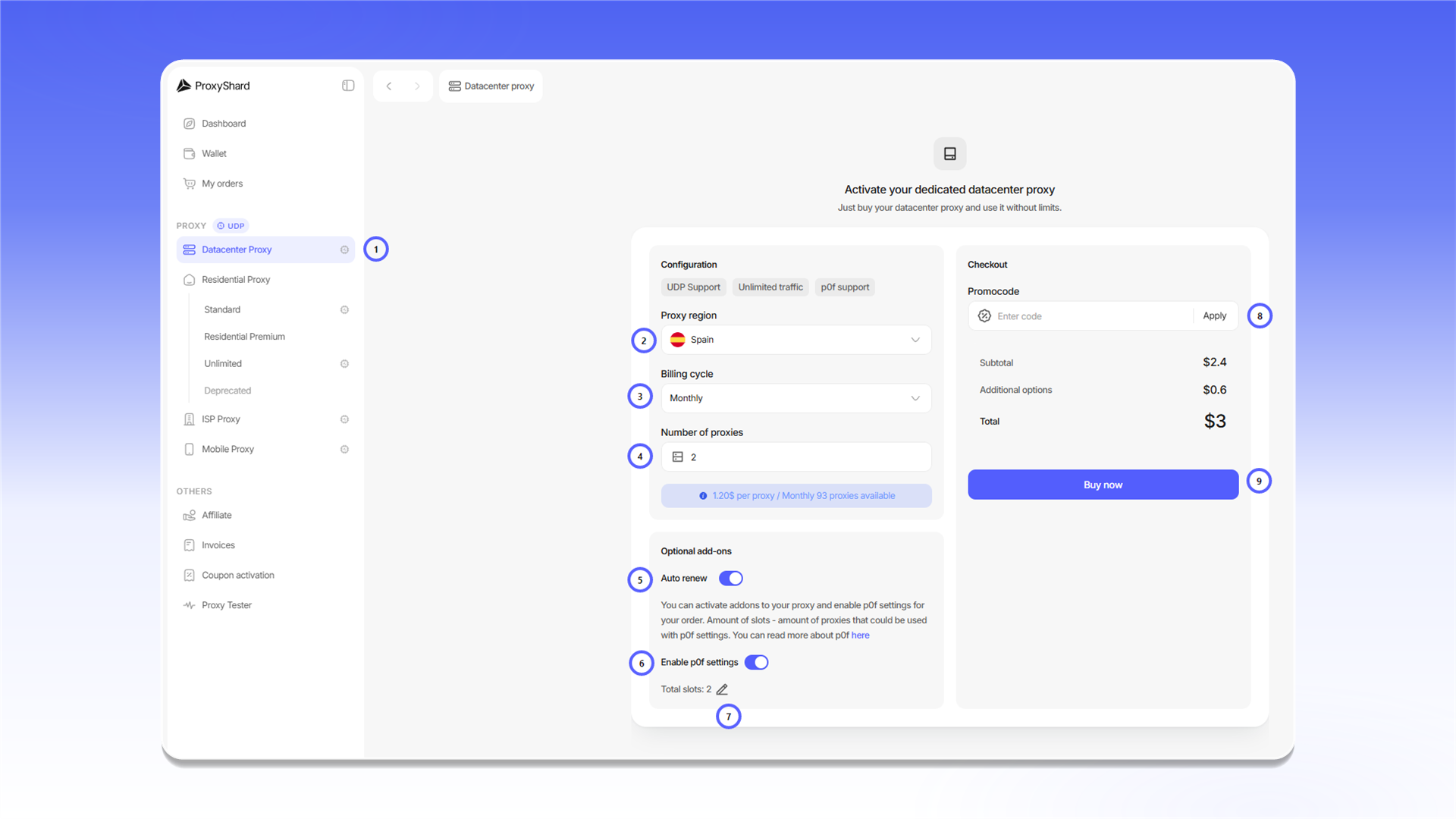
## How to purchase
1. Open `Datacenter Proxy`.
2. Select a country in `Proxy region`.
3. Select the rental period in `Billing cycle`.
4. Enter the quantity in `Number of proxies`.
5. Enable `Auto renew` if you want the order to renew automatically.
6. Enable `Enable p0f settings` if required.
7. In `Total slots`, enter how many proxies should use p0f spoofing.
8. If you have a promo code, enter it in `Promocode` and click `Apply`.
9. Review the total and click `Buy now`.
Payment and renewal are covered in [Purchasing ISP / Datacentre proxies](/eng/site-navigation/buying-and-renewing/buying-datacenter-proxies.md).
{% hint style="info" %}
After payment, allow 1-2 minutes for the order to synchronize and the proxies to start working.
{% endhint %}
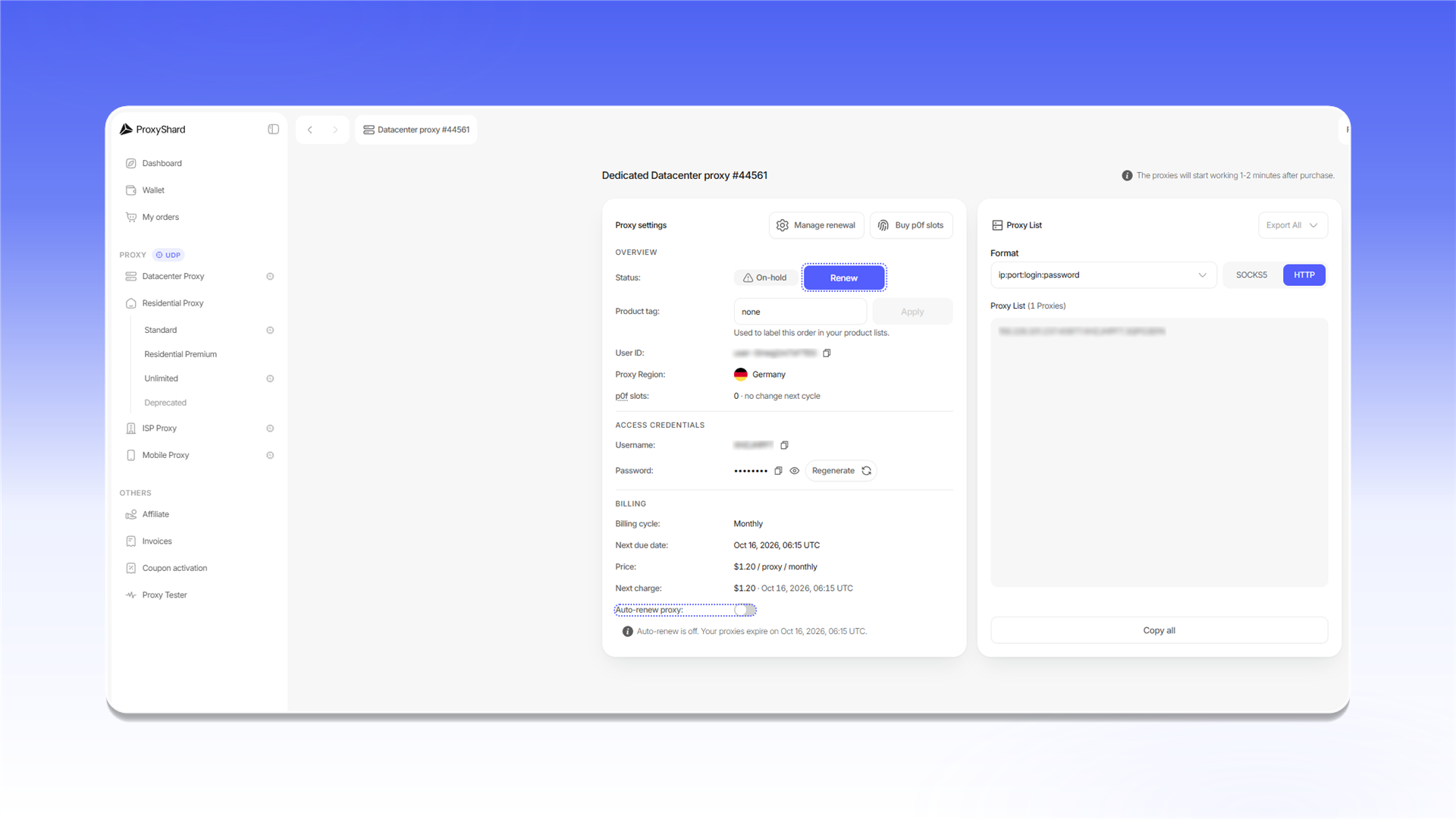
## Order fields
* `Status` shows the order state: `Active`, `On-hold`, or `Canceled`.
* `Product tag` adds a label that you can use to find the order in product lists.
* `User ID` identifies the order internally and may be requested by support.
* `Proxy Region` shows the selected country.
* `p0f slots` shows the active p0f slots and the change scheduled for the next billing period.
* `Username` and `Password` contain the credentials. `Regenerate` creates a new password, so existing proxy strings stop working.
* `Billing cycle`, `Next due date`, `Price`, and `Next charge` show the rental term and the next payment.
* `Auto-renew proxy` controls automatic renewal. The same settings are available through `Manage renewal`.
* `p0f` and `Buy p0f slots` open the fingerprint settings and the purchase of additional slots.
* In `Proxy List`, you can select `HTTP` or `SOCKS5`, change the proxy string format, copy the list with `Copy all`, or download it with `Export All`.
{% hint style="danger" %}
An order with the `Canceled` status cannot be restored. This status is assigned after three days without payment.
{% endhint %}
## What tasks they fit
Most crypto exchanges, Polymarket and platforms, mass web scraping of simple sites, fast collection of public data, availability and uptime checks, SEO scraping, price monitoring on weakly protected sites, load testing of your own systems, scraping catalogs and directories, API request automation.
## Pros and cons of Datacenter proxies
#### Pros:
* **Wide channel in a Tier 4 data center** with the lowest possible latency
* **Static addresses, one user only** - the IP does not change during the rental
* **p0f and UDP support**
* **Low price** - the most affordable option among all products
* **Flexible rental periods** - from 3 days to a month
* **High stability and availability**
#### Cons:
* **Easily detected** - major geolocation databases tag them DC / Hosting; this is normal and we don't hide it
* **Not suitable for some platforms** - certain resources block DC addresses outright (for example, the DePIN projects Grass and Gradient)
{% hint style="success" %}
These restrictions are bypassed with [ISP proxies](/eng/our-products/isp-proxies.md).
{% endhint %}
{% hint style="info" %}
See the [setup guides](/eng/usage-instructions/getting-started.md) for proxy configuration instructions.
{% endhint %}
---
# Agent Instructions
This documentation is published with GitBook. GitBook is the documentation platform designed so that both humans and AI agents can read, navigate, and reason over technical content effectively. Learn more at gitbook.com.
## Querying This Documentation
If you need additional information that is not directly available in this page, you can query the documentation dynamically by asking a question.
Perform an HTTP GET request on the current page URL with the `ask` query parameter, and the optional `goal` query parameter:
```
GET https://docs.proxyshard.com/eng/our-products/datacenter-proxies.md?ask=&goal=
```
`ask` is the immediate question: it should be specific, self-contained, and written in natural language.
`goal` is optional and describes the broader end goal you are ultimately trying to accomplish on behalf of the user. GitBook uses it to tailor the answer towards what is most useful for that goal.
The response will contain a direct answer to the question and relevant excerpts and sources from the documentation.
Use this mechanism when the answer is not explicitly present in the current page, you need clarification or additional context, or you want to retrieve related documentation sections.